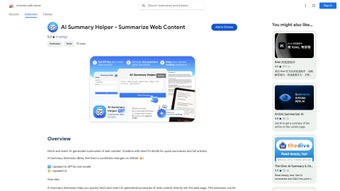

Download AI Summary Helper – Fast, Secure Web Content Summarization Tool
Overview
AI Summary Helper is a cutting‑edge Google Chrome extension that turns endless web articles into bite‑size, readable summaries in seconds. Built on advanced natural‑language‑processing models, the tool reads the full text of any online page, extracts the most relevant points, and presents a concise overview that you can copy, print, save as a PDF, or ship directly to your Kindle via Reabble’s Send to Kindle integration. Whether you’re a researcher juggling dozens of papers, a marketer scanning industry news, or a casual reader who wants the gist before diving deep, AI Summary Helper streamlines the reading process and saves valuable time. The extension also lets you tailor the summary prompt, ask follow‑up questions, and control the length of the output, giving you a personalized experience that adapts to any content type—from long‑form investigative journalism to technical documentation. Future updates promise even more sophisticated AI models, multi‑language support, and tighter integration with popular note‑taking apps. In short, AI Summary Helper is not just a summarizer; it’s a productivity companion that makes online reading faster, smarter, and more convenient.
Key Features & Benefits
- One‑Click Summarization: Generate a concise overview of any web article with a single click.
- Custom Prompt Engine: Adjust the summary style, length, or focus by editing the prompt.
- Ask Follow‑Up Questions: Pose specific queries to the AI for deeper insight without leaving the page.
- Send to Kindle Integration: Transfer full articles or summaries to your Kindle using Reabble’s Send to Kindle feature.
- Export Options: Save summaries as PDFs, print them directly, or copy to clipboard for quick sharing.
- Secure & Private: All processing occurs via encrypted connections; no personal data is stored locally.
- Future‑Ready AI Models: Roadmap includes GPT‑4‑level models, multilingual support, and AI‑driven citation generation.
Pros
- Instantly reduces reading time for long articles.
- Highly customizable prompts let you control tone and detail.
- Seamless Kindle integration eliminates manual file transfers.
- Free to use with optional premium upgrades for faster processing.
- Lightweight extension that doesn’t slow down Chrome.
Cons
- Current AI model may occasionally miss niche jargon.
- Limited offline functionality; requires internet connection.
- PDF export format is basic; advanced styling requires external tools.
Overall Rating: 4.5/5 – AI Summary Helper delivers a smooth, feature‑rich experience that dramatically cuts down the time spent on online reading.
Installation, Usage & Compatibility
How to Install
- Open Google Chrome and navigate to the Chrome Web Store.
- Search for AI Summary Helper or click the direct link provided on the developer’s website.
- Click Add to Chrome and confirm the permissions request.
- Once installed, the extension’s icon appears next to the address bar.
- Pin the icon for easy access by clicking the puzzle‑piece icon and selecting “Pin”.
Using the Extension
After installation, summarizing an article is as simple as opening the page you want to condense, clicking the AI Summary Helper icon, and selecting “Generate Summary”. A sidebar slides in, showing the AI‑crafted overview. From there you can:
- Adjust the summary length using the slider.
- Enter a custom prompt to focus on specific aspects (e.g., “Highlight the main findings”).
- Ask a follow‑up question in the “Ask AI” box for deeper clarification.
- Click “Save as PDF”, “Print”, or “Send to Kindle” to export the content.
The extension also stores a short history of your recent summaries, allowing you to revisit or re‑export them later.
System Compatibility
AI Summary Helper is a browser‑based tool, so it works on any operating system that supports Google Chrome, including Windows 10/11, macOS Monterey and later, Linux distributions, and Chrome OS. The extension is also compatible with Chrome‑based browsers such as Microsoft Edge and Brave, providing the same feature set across platforms.
FAQ
Is AI Summary Helper free to use?
Yes, the core summarization features are completely free. A premium tier is planned for faster processing, higher word limits, and priority access to upcoming AI models.
Can I summarize pay‑walled articles?
The extension works on any page you can view in Chrome, including pay‑walled content you have access to. It does not bypass subscription barriers.
How secure is my data?
All data is transmitted over HTTPS, and the extension does not store any personal information on external servers. Summaries are generated in real time and are not saved unless you choose to export them.
Can I use AI Summary Helper on mobile?
A mobile version is under development. Currently, the Chrome extension works on desktop browsers, but you can access the web app from any mobile browser with limited functionality.
What languages does the AI support?
The current model handles English fluently and provides basic support for major European languages. Multilingual expansion is part of the roadmap for the next major update.
Conclusion & Call to Action
AI Summary Helper transforms the way you consume web content, turning hours of reading into minutes of insight. Its seamless Chrome integration, customizable prompts, and Kindle export capabilities make it a must‑have productivity tool for students, professionals, and avid readers alike. With a free tier that already delivers impressive results and a clear roadmap for even smarter AI, there’s no reason to keep scrolling through long articles without a summary. Download AI Summary Helper today, add it to Chrome, and experience the power of instant, secure summarization. Your next great idea is just a summary away.



.png)



